On this page

    Update Project Cost by Importing Rate Sheets Using Project Planner

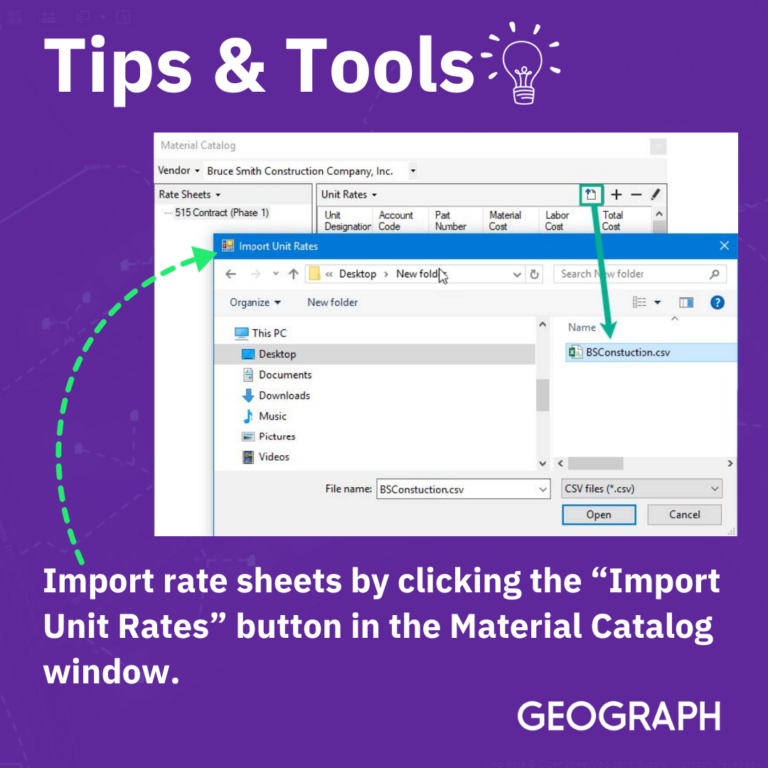
    Another way to load rate sheet material-unit data is to import it directly from a vendor-provided rate sheet csv file. To import a file containing a vendor rate sheet, click the “Import Unit Rates” button in the Material Catalog window. This will open a dialog window that can be used to locate and import an existing csv file on the user’s computer.

    For more, check out this article on our support portal.

    9067
    Your next step

    Learn more about GEOGRAPH

    Start a conversation

    Talk with our team

    Tell us about your network and where you're running into friction.

    Talk with our team

    See the platform

    Explore CrescentLink

    Get a closer look at how fiber teams use CrescentLink day to day.

    See CrescentLink

    Keep reading

    Back to the blog

    More insights on fiber network management and operations.

    Explore the blog